Section 1.5 Design Tools
Design tools are always available to aid in project design and implementation.
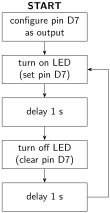
One important design tool is a flowchart. Flowcharts describe the steps that a program must implement. These can be referred to when writing the corresponding software code. A benefit of flowcharts is that they are language independent. In other words, given a flowchart, the program could then be implemented using the C programming language as easily as in assembly. An example flowchart is shown in Figure 1.5.1.
Another important design tool is circuit simulation software which tests circuit functionality before wiring any hardware or writing any software code. Working with simulation software may be a large part of your future job. There are many different software packages that exist. You may have used CircuitVerse, Logisim, or NI Multisim in an introduction to digital systems class. These are all hardware simulation packages.
Tinkercad is circuit simulation software that allows testing of both the hardware and software using the Arduino Uno R3. This gives you the benefit of trying out new designs without necessarily having any access to an Arduino or any other components. (Note that not all Arduino functionality is possible on Tinkercad. Notably, many of the serial communication protocols have not been implemented in Tinkercad as of October 2025.)

