Microcontrollers

Section 9.7 ATmega328P Input Capture Unit

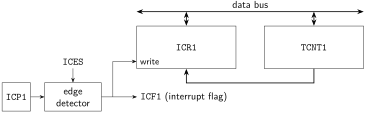
Timer/counter 1 on the ATmega328P has an input capture unit in addition to its two output compare units. The capture unit is capable of detecting rising or falling edges applied to the input capture pin (ICP1). A high-level block diagram of the input capture unit is shown in Figure 9.7.1.
The data bus writes bidirectionally to ICR1 and TCNT1. TCNT1 can write to ICR1. Input pin ICP1 connects to the edge detector. The other input to the edge detector is the ICES signal. The outputs of the edge detector are the ICF1 interrupt flag and the write signal to ICR1.
Figure 9.7.1. Block diagram of the timer/counter 1 input capture unit.
The trigger event on ICP1 is based on the value of the input capture edge select (ICES) bit in timer/counter 1 control register B (TCCR1B). When ICES = 0, an input capture is triggered on a falling edge of the signal. Otherwise, an input capture is triggered on a rising edge.
At the moment of a capture event, the value of TCNT1 is written to the input capture register (ICR1). At the same time, the input capture flag ICF1 is set.
It is recommended to use the input capture unit only when the value of TOP used with timer/counter 1 is unchanging, and only when the value in the timer/counter will exclusively increment (in other words: do not use the input capture unit in phase-correct or phase- and frequency-correct PWM modes). It’s important to understand the time interval between timer/counter increments, and ensure that any input signal will be sampled often enough by the timer/counter to adequately trigger on rising or falling edges. Care should also be taken to understand the timing of the input capture event interrupt. If the interrupt service routine (ISR) is lengthy enough, a second trigger event could occur, causing the value of ICR1 to change. Therefore, it’s important to store the value of ICR1 to a variable as early in the ISR as possible.

Subsection 9.7.1 Using the Input Capture Unit to Measure Signal Timing

The input capture unit can be used to measure the period and duty cycle of devices that output a square wave signal. To calculate the waveform period, two subsequent identical edges can be captured (either both rising edges or both falling edges). The value stored in ICR1 at each edge denotes the timestamp when the edge occurred. Subtracting the timestamp of the second edge (\(K_2\)) from the timestamp (\(K_1\)) of the first edge gives the number of timer/counter increments between the edges (\(K\)), as defined in (9.7.1).
\begin{equation} K = K_1 - K_2\tag{9.7.1} \end{equation}
The amount of time that elapses between each increment of the timer/counter can be calculated based on the prescaler (\(N\)) of the timer/counter and the I/O clock frequency (\(f_{CLK,I/O}\)), and is defined in (9.7.2).
\begin{equation} \Delta t = \frac{N}{f_{CLK,I/O}}\tag{9.7.2} \end{equation}
The period of the wave can therefore be calculated as defined in (9.7.3).
\begin{equation} T = K \times \Delta t\tag{9.7.3} \end{equation}

Example 9.7.2. Using timer/counter 1 to calculate the period of a square wave on ICP1.

An example waveform applied to ICP1 is shown in Figure 9.7.3, with ICES configured to trigger a capture event on a rising edge of the input signal. The timestamp at each rising edge is shown.

An input signal is shown oscillating between 0 and 5 V at regular intervals. The value in TCNT1 at the first rising edge is 15. The value in TCNT1 at the second rising edge is 25. The value in TCNT1 at the third rising edge is 35.
Figure 9.7.3. Example input waveform on ICP1 with timestamps from TCNT1.
If the prescaler of the timer/counter is equal to 64, and the clock frequency is 8 MHz, the period of the wave can be calculated as shown in (9.7.4).
\begin{equation} T = (25-15) \times \frac{64}{8 \times 10^6~\textrm{Hz}} = 80~\mu\textrm{s}\tag{9.7.4} \end{equation}

The HIGH period of a square wave can be measured, but requires capturing a rising edge and subsequent falling edge of the input signal. This means that ICES needs to be modified between capture events. The timestamp of the rising edge (\(K_R\)) can be subtracted from the timestamp of the falling edge (\(K_F\)) to calculate the number of increments that occurred between the two events, as defined in (9.7.5).
\begin{equation} K = K_F - K_R\tag{9.7.5} \end{equation}
The relationship between time between increments is the same as that used for calculating the period. The HIGH period is also calculated by multiplying the number of increments by the amount of time that elapses between increments.

Example 9.7.4. Using timer/counter 1 to calculate the period and duty cycle of a square wave on ICP1.

An example waveform applied to ICP1 is shown in Figure 9.7.5, with ICES configured to trigger a capture event on a rising edge of the input signal, and then switch to triggering a capture event on a falling edge. The timestamp at each trigger event is shown.
An input signal is shown oscillating between 0 and 5 V at regular intervals. The value in TCNT1 at the first rising edge is 150. The value in TCNT1 at the first falling edge is 180. The value in TCNT1 at the second rising edge is 250. The value in TCNT1 at the second falling edge is 280. The value in TCNT1 at the third rising edge is 350. The value in TCNT1 at the third falling edge is 380.
Figure 9.7.5. Example input waveform on ICP1 with timestamps from TCNT1.
If the prescaler of the timer/counter is equal to 1024, and the clock frequency is 1 MHz, the HIGH period of the wave can be calculated as shown in (9.7.6).
\begin{equation} T_{HIGH} = (180 - 150) \times \frac{1024}{1 \times 10^6~\textrm{Hz}} = 30.72~\textrm{ms}\tag{9.7.6} \end{equation}
The overall period of the wave is calculated as shown in (9.7.7).
\begin{equation} T = (250 - 150) \times \frac{1024}{1 \times 10^6~\textrm{Hz}} = 102.4~\textrm{ms}\tag{9.7.7} \end{equation}
To calculate the duty cycle, simply use the relationship between duty cycle, period, and HIGH period. For the waveform depicted in Figure 9.7.5, the duty cycle is equal to the calculation shown in (9.7.8).
\begin{equation} D = \frac{30.72~\textrm{ms}}{102.4~\textrm{ms}} = 30\%\tag{9.7.8} \end{equation}

