Section 14.8 Control Flow: Conditional
A microcontroller can execute instructions using three different paradigms: sequential, conditional, and iterative. The sequential flow of code is what normally occurs in C programs. The program execution starts at the first line of code and carries out every subsequent line in order. At times, however, it is necessary to execute code in a different fashion depending on the value of one or more variables. This type of control flow is known as conditional flow. (Iterative control flow will be introduced in Section 14.9.)
Subsection 14.8.1 if, if/else, and if/else if/else Statements
The
if statement is a conditional statement that executes a different set of code based on the result of a Boolean and/or comparison operation. (For example, when continuously polling a pushbutton to determine its state, the code may need to turn on an LED if the button was pushed.) An example if statement is shown below.
// normal operation
if (condition) {
    // do something else
}
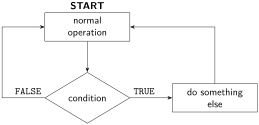
if statement.An
if statement cannot accommodate a situation where a different block of code should be executed if the conditional is TRUE than when it’s FALSE. (An if statement will execute one block of code if TRUE, and nothing if FALSE.) In this case, an if/else can be used. One piece of code will execute if TRUE (located in the if block) and a different piece of code will execute if FALSE (located in the else block). Note that TRUE and FALSE are mutually exclusive conditions (they cannot both be true simultaneously).
// normal operation
if (condition) {
    // do thing A
}
else {
    // do thing B
}
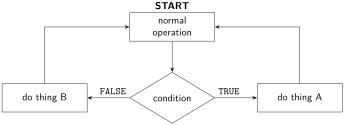
if/else statement.Once an
if statement conditional is TRUE, no subsequent elements of that control flow sequence will be checked or executed. Therefore, if it’s possible that two (or more) separate non-mutually exclusive conditions can be TRUE, and both need some type of special code to execute, then separate if statements should be used.
If more than two mutually exclusive conditions need to be checked in conditional control flow, one or more
else if block can be included after the if statement. An optional else can be included at the conclusion to execute if the if and all else if conditions are FALSE. An example of if/else if/else code is shown below.
// normal operation
if (conditionA) {
    // do thing A
}
else if (conditionB) {
    // do thing B
}
else {
    // do thing C
}
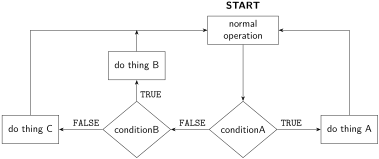
if/else if/else statement.Subsection 14.8.2 Switch Case
If a single variable needs to be compared to multiple different values, it can be more efficient to use a switch case instead of multiple repeated
if/else if blocks. Code for a switch case is shown below.
switch (j) {
    case 1:
        // do thing 1
        break;
    case 2:
        // do thing 2
        break;
    case 3:
        // do thing 3
        break;
    case 4:
        // do thing 4
        break;
}
The
break keyword tells the compiler to exit the switch case after completing the code in that case. If absent, the compiler will continue to execute code in the switch case sequentially until a break condition is met or the switch case has completed.
A flowchart depicting how the above switch case code works is given in Figure 14.8.4.
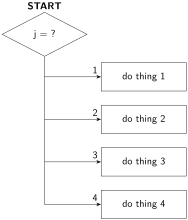
If different code should be executed in case all of the defined cases are FALSE, then a
default case can be included at the end of the switch case. The default case does not require a break keyword because it is at the end of the switch case. Example code is shown below.
switch (j) {
    case 1:
        // do thing 1
        break;
    case 2:
        // do thing 2
        break;
    default:
        // do something if 1 and 2 are FALSE
}

