Section 7.2 Sensor Calibration
In order to obtain meaningful information from sensors, they must be characterized and calibrated. In other words, it is critical to know how to convert the output voltage into the physical quantity that it is meant to represent. This can be accomplished by checking the sensor datasheet or by performing a manual calibration.
Subsection 7.2.1 Datasheet Calibration
Some sensors have datasheets that explain how the output corresponds to the physical quantity. For example, the TMP36 temperature sensor datasheet states that the output has a slope of \(10~\textrm{mV}/^{\circ}\textrm{C}\) and that an output voltage of \(750~\textrm{mV}\) indicates a temperature of \(25~^{\circ}\textrm{C}\text{.}\) From this, the equation between temperature (\(T\text{,}\) measured in °C) and output voltage (\(V_{out}\text{,}\) measured in V) can be derived as defined in (7.2.1).
\begin{equation}
T = 100V_{out} - 50\tag{7.2.1}
\end{equation}
As discussed in Section 6.4, the ATmega328P has a 10-bit analog to digital converter (ADC), which outputs a value of 0 when the input voltage is 0 V, and a value of 1023 when the input voltage is 5 V. Therefore an equation can be derived directly between the value of the ADC and the temperature. This data is depicted graphically in Figure 7.2.1.
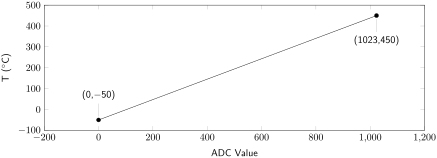
Deriving an equation for the slope of the line connecting the two datapoints yields a relationship between the value output by the ADC and the temperature. This is what will be used to calculate the temperature using the ADC value provided by the microcontroller. This equation is given for the TMP36 sensor in (7.2.2).
\begin{equation}
T = \frac{500~^\circ\textrm{C}}{1023}(\textrm{ADC value}) - 50~^\circ\textrm{C}\tag{7.2.2}
\end{equation}
This can be programmed, avoiding the use of floating-point math, using the following code, where \(n\) is the resolution of the ADC. (This makes it easy to port code between an ADC run in 8-bit mode and an ADC run in 10-bit mode, for example.)
T = ((500L * ADC) >> n) - 50
Subsection 7.2.2 One Point Calibration
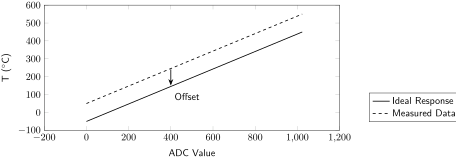
When put into practice, the sensor may not give the output that that was expected. If there is a discrepancy between the output of the sensor and that of a trustworthy reference, the data must be further calibrated. One-point calibration is used when slope is correct but there’s an offset between measured and actual data (as measured by a trustworthy reference). If the measured data is greater than the actual data, the offset must be subtracted, and if the measured data is less than the actual data, the offset must be added. This is shown graphically in Figure 7.2.2.
Subsection 7.2.3 Multipoint Calibration
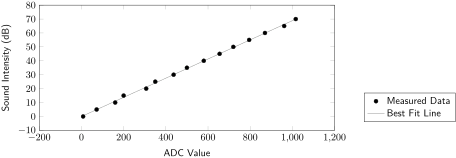
If the output response of a sensor is not known, it must be found using a reference instrument to measure the physical quantity and compare it to the ADC values output by the sensor. Use as many known reference points as possible, and use plotting software such as Excel to find a best fit line, keeping in mind that the best fit line may not always be linear. This best fit line will then be used in software to convert the ADC value into the corresponding physical quantity. A hypothetical example is shown in Figure 7.2.3 with a linear relationship found between sound intensity and ADC values.
Subsection 7.2.4 Nonlinear Outputs
When data is nonlinear, there are a couple options to consider for calibrating the sensor.
If the sensor is nonlinear throughout its entire range, but will be essentially linear throughout the expected operating range, then it may be acceptable to treat the output as a linear function of the ADC value. (Do this with caution: if the sensor is operated outside of the expected range, the output values will be invalid!)
If there is plenty of processing power and program memory (but perhaps not much data memory), then a best-fit equation can be derived. The non-linear math can be handled using trustworthy subroutines.
If instead there is plenty of data memory (but perhaps not much processing power or program memory), a lookup table of output values can be stored in data memory as an array based on the ADC values. For example, when using the ADC in 8-bit mode, a table of 256 output values can be stored in data memory, one corresponding to each output given an ADC value from 0-255.

