Just as there are conditional and iterative control flow operations in C, there are instructions that allow for these same processes in AVR assembly. It is important to have a solid understanding of branch instructions and memory addressing, as these are fundamental to carrying out conditional logic in assembly.
One subset of branch instructions are jump instructions, which tell the microcontroller to move to a different part of memory. Essentially, these instructions change the value of the program counter so that a different part of the program memory will be addressed on the next clock cycle. The two most important jump instructions in AVR assembly are
relative jump (RJMP) jumps to a relative location in program memory, this instruction moves forward or backward in memory space using a relative change in the program counter (note that RJMP is not always capable of addressing the entire memory space of a microcontroller).
There are also call and return instructions which are used for executing subroutines. When the long call to subroutine (CALL) instruction is executed, the address of the instruction after the CALL instruction is stored into the stack. The return from subroutine (RET) instruction tells the microcontroller that the subroutine has concluded. This will move the address previously stored in the stack into the program counter.
The following example code demonstrates a subroutine used to send data through the SPI protocol (introduced in Section 10.2). The subroutine is called using the long call to a subroutine (CALL) instruction. The conclusion of the subroutine includes the return from subroutine (RET) instruction.
SETUP:
    ; configure SPI (not shown)
    ; configure I/O pins as needed (not shown)

LOOP:
    ; execute repeating code
    ; data to send through SPI will be stored into register r16
    CALL writetospi
    ; execute any other repeating code
    JMP LOOP

writetospi:
    ; write data from register r16 to SPDR
    OUT SPDR, r16
    ; wait for data to be fully clocked out of SPDR
    waitforwrite:
        IN r16, SPSR
        SBRS r16, 7
        JMP waitforwrite
    RET
The return from interrupt (RETI) instruction is another important branch instruction. This instruction should be used at the conclusion of any interrupt service routine (ISR) to tell the microcontroller to return back to the location in the program counter that was stored when the interrupt was triggered in hardware. The RETI instruction also causes the microcontroller to set the global interrupt enable flag (I).
Example15.3.2.Interrupt service routine (ISR) in assembly.
An interrupt service routine is defined in assembly by storing a program location to the corresponding address in the interrupt vector table (introduced in Table 8.1.1). The interrupt service routine must conclude with the return from interrupt (RETI) instruction.
The following example code generates an ISR that toggles an LED connected to pin D6 whenever timer/counter 0 overflows. (The initialization of timer/counter 0 is not shown.)
.org 0x0020
    RJMP TIMER0OVF

SETUP:
    CLI
    ; configure timer/counter 0 (not shown)
    SEI
    ; configure pin D6 as an output pin (LED)
    SBI DDRD, 6
    ; store value to "bitwise XOR" in r17
    LDI r17, 0x40

LOOP:
    ; execute any repeating tasks
    JMP LOOP

TIMER0OVF:
    ; store contents of PORTD in r16
    IN r16, PORTD
    ; exclusive OR to toggle pin D6
    EOR r16, r17
    ; store result back to PORTD
    OUT PORTD, r16
    ; return from interrupt
    RETI
In C, the contents of conditional and iterative control flow is denoted by the use of curly brackets. This syntax does not exist in assembly. In assembly, control flow is initiated with the use of arithmetic, logic, and/or compare instructions to generate the condition. Then, a branch instruction is used to execute a particular piece of code if the branch condition is met.
Branch instructions cause the code to jump to a different address in memory if a certain condition is met. There many possible branch conditions, including
branch if greater or equal (signed) (BRGE) and branch if same or higher (unsigned) (BRSH), which will branch if one number is greater than or equal to another, and
; define a subroutine known as function1
function1:
    ; compare two registers, repeat function1 if they are equal
    CP r1, r2
    BREQ function1
Subsection15.3.1Conditional Control Flow
As seen in Section 14.8, conditional control flow in C took on the form of if statements and switch cases. Each of these possibilities can be accomplished in AVR assembly as well.
A single if statement can be executed by using a compare instruction followed by a branch instruction. This works for checking to see if two values are equal, unequal, greater than, or less than, and making a decision based on the result.
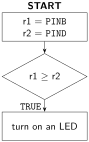
Example15.3.3.Single conditional branch (if equivalent) if one value is greater than or equal to another.
Write conditional logic that branches to a subroutine named conditiontrue that would be represented by if (PINB >= PIND) in C code. If the condition is true, an LED connected to pin C5 should be turned on.
; configure pin C5 as output
SBI DDRC, 5
; store contents of PINB and PIND into general purpose registers
IN r1, PINB
IN r2, PIND
; compare r1 and r2
CP r1, r2
BRSH conditiontrue
; condition false
JMP end
; condition true subroutine
conditiontrue:
    SBI PORTC, 5
end:
This code is using unsigned values in registers r1 and r2, which is why the BRSH instruction is used. Had signed values been necessary, the BRGE instruction would have been used instead.
This code can be modified to act as an if/else statement using the lines of code between the BRSH instruction and the conditiontrue subroutine. Series of nested if/else statements can be used to generate an if/else if/else situation.
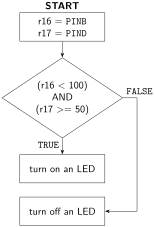
Example15.3.5.Two conditional branches (if/else equivalent) depending on general purpose register values.
Write conditional logic that branches to a subroutine named conditiontrue that would be represented by if ((PIND < 100) && (PINB >= 50)) in C code. If the condition is true, an LED connected to pin C5 should be turned on. If the condition is false, the LED connected to pin C5 should be turned off.
; configure pin C5 as output
SBI DDRC, 5
; store contents of PINB and PIND into general purpose registers
IN r16, PINB
IN r17, PIND
; compare r16 with 100
CPI r16, 100
; if r16 >=100, condition is FALSE
BRSH conditionfalse
; compare r17 with 50
CPI r17, 50
; if r17 < 50, condition is FALSE
BRLO conditionfalse
conditiontrue:
    SBI PORTC, 5
    JMP end
conditionfalse:
    CBI PORTC, 5
end:
This example uses general purpose registers r16 and r17 (which both obtain their data from I/O registers). If the condition is satisfied, an LED connected to pin 5 in port C is turned on. Otherwise, the LED is turned off.
Note that general purpose registers used in this example must be at least 16 due to the use of instructions using immediate addressing. Note also that unsigned values were used in both general purpose registers.
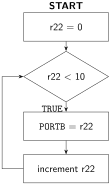
The equivalent of a for loop can be accomplished in assembly by initializing a general purpose register to take on a particular value, executing the iterative code, executing the afterthought to the general purpose register, and then comparing the value of the general purpose register to the conditional statement.
Example15.3.7.Incrementing the value in a register.
Write conditional logic that increments the value stored in PORTB between 0 and 9 (perhaps it is connected to a 7-segment display via a BCD to 7-segment decoder).
As with C code, a statement such as a for loop is used when a segment code should be iterated a given number of times before returning to normal operation. When a condition needs to be met after iterating an unknown number of times, a while or do/while type of loop should be used instead. The equivalent assembly code will still use compare and branch instructions, the only difference from the for configuration will be the ordering of each exact instruction.
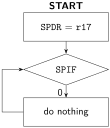
Example15.3.9.Iterate an unknown number of times until a condition is met.
Write code that writes data from a general purpose register into the SPI data register (SPDR), then iterates an unknown number of times until the SPI interrupt flag (SPIF) in the SPI status register (SPSR) is set. (This is the process used in the SPI protocol, introduced in Section 10.2, to ensure that data written to the SPI data register has fully shifted out of the microcontroller.)
In assembly, this operation is carried out using a compare instruction on two general purpose registers and then a branch instruction if the two registers are equal using BREQ.
The compare instruction executes the operation r1 - r2. If the result is zero (indicating that the two values are equal), the Z flag in SREG will be set. Therefore, the BREQ instruction checks to see if the Z flag in SREG had been set as a result of the previous instruction and uses that to decide whether or not to change the value of the program counter.
Because flag checks are how the branch instructions know whether or not to change the value of the program counter, it can be seen why there are no “greater than” or “less than or equal to” instructions. With unsigned values, a greater than situation would occur if Z = 0 AND C = 0, so both flags would need to be logically compared. It is possible to do this in assembly manually, but it is much easier to change the value to compare with. Similarly, with unsigned values, a less than or equal to situation would occur if C XOR Z is TRUE.