Section 14.9 Control Flow: Iterative
Iterative flow of code is used to repeat identical (or nearly identical) functions a certain number of times (or infinitely). An example application is the circular buffer, introduced in Subsection 7.3.1. An average requires all of the elements of an array to be summed together before being divided by the number of array entries. Rather than having one line of code for each array element (which would be inefficient on many levels), a loop can be used to repeat code a certain number of times before returning to sequential flow.
Subsection 14.9.1 for Loop
for loops are best used when a given segment of code needs to be iterated a defined number of times (such as the example of summing up the circular buffer, which must be iterated a number of times equal to the number of elements in the array). The syntax of a for loop is demonstrated below.
for (initialization; condition; afterthought) {
    // iterative code goes here
}
The terms in the parenthesis (all of which are optional) each establish different parameters of the loop. The initialization is used to declare any variables required within the loop that aren’t already declared. The condition is a conditional statement (using Boolean and/or conditional operators) is then checked. If the conditional is TRUE, the contents of the loop will be executed. If the conditional is FALSE, the program will exit the loop. An optional afterthought is executed at the end of the loop every time the loop executes. The initialization, condition, and afterthought are used to control how many times the conditional logic will execute.
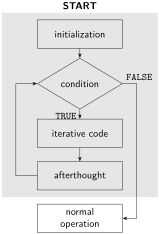
for loop. The contents of the for loop are shown shaded in gray.An infinite
for loop is used when code needs to be repeated indefinitely, and can be written by leaving the initialization, condition, and afterthought blank as follows.
for (;;) {
    // this code will repeat indefinitely
}
Subsection 14.9.2 while Loop
A second type of loop is the
while loop. It is recommended to use a while loop when code needs to be repeated an unknown number of times until a particular condition is met. The syntax of a while loop is demonstrated below.
// optional initialization can occur here
while (condition) {
    // optional initialization can also occur here
    // iterative code goes here
    // optional afterthought
}
Unlike a
for loop, a while loop does not establish an initialization and afterthought in the conditional statement. Any variables that require initializing can be declared prior to or inside of the while loop, and any afterthoughts can occur at the conclusion of the loop.
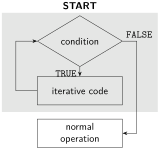
while loop. The contents of the while loop are shown shaded in gray.An infinite
while loop is used when code needs to be repeated indefinitely, and can be written by setting the condition equal to any TRUE value. This is depicted below.
while (1) {
    // this code will repeat indefinitely
}
Subsection 14.9.3 do/while Loop
A third type of loop is the
do/while, which is very similar to a while loop, except that the body of the code is executed once before the condition is checked. The syntax of a do/while loop follows.
// optional initialization can occur here
do {
    // optional initialization can also occur here
    // iterative code goes here
    // optional afterthought
} while (condition);
A
do/while loop does not establish an initialization and afterthought in the conditional statement. Any variables that require initializing can be declared prior to or inside of the do statement, and any afterthoughts can occur at the conclusion of the loop.
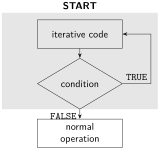
do/while loop. The contents of the do/while loop are shown shaded in gray.An infinite
do/while loop is used when code needs to be repeated indefinitely, and can be written by setting the condition equal to any TRUE value. This is depicted below.
do {
    // this code will repeat indefinitely
} while (1);

