Bitwise operators come in multiple forms. Binary bitwise operations (the term “binary operation” refers to the fact that there are two operands, not the datatype of any of the operands) include AND, OR, and XOR. In these operations, each bit of one operand is compared to each bit in the other operand and the logical operation is performed between those two values. Unary bitwise operations (operations that have only one operand) include NOT (where each individual bit is inverted) and bitshift operations.
Bitwise operations are used to manipulate binary values especially when only some values in a data byte need to be changed while leaving others alone. For this reason, they are used frequently when changing particular bits in PORTxn registers or when accessing the values stored in PINxn registers.
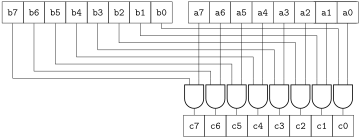
The bitwise AND operator, & calculates the logical AND between each individual bit in the two operands. The operation c = a & b is depicted in Figure 14.5.1 for two 8-bit operands a and b. Because taking a logical AND with the number 0 results in a 0, the bitwise AND operation is used to selectively clear bits while leaving others alone.
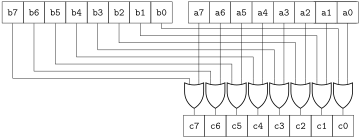
The bitwise OR operator, | calculates the logical OR between each individual bit in the two operands. The operation c = a | b is depicted in Figure 14.5.2 for two 8-bit operands a and b. Because taking a logical OR with the number 1 results in a 1, the bitwise OR operation is used to selectively set bits while leaving others alone.
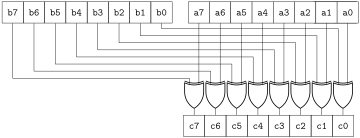
The bitwise XOR operator, ^ calculates the logical XOR between each individual bit in the two operands. The operation c = a ^ b is depicted in Figure 14.5.3 for two 8-bit operands a and b. Because taking a logical XOR with the number 1 results in a toggle, the bitwise XOR operation is used to selectively toggle bits while leaving others alone.
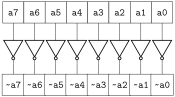
The bitwise NOT operator, ~, acts to invert each individual bit of a single operand, as depicted in Figure 14.5.4 for an 8-bit operand a. The bitwise NOT operation is used to toggle all bits in a variable simultaneously.
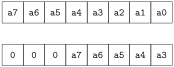
The bitshift right operator, >>, shifts the operand to the right a specific number of places. When being bitshifted to the right, the number 0 will be shifted in to the most significant bit.
An 8-bit variable a is bitshifted right 3 times using the following code. (Note that the code utilizes a compound bitshift operation. Compound operators are described in Section 14.7.)
Figure 14.5.6 (top) depicts the initial values stored in the variable a. Figure 14.5.6 (bottom) depicts the values stored in the variable a after the bitshift operation has finished executing.
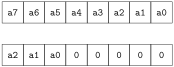
The bitshift left operator, <<, shifts the operand to the left a specific number of places. When being bitshifted to the left, the number 0 will be shifted in to the least significant bit.
An 8-bit variable a is bitshifted left 5 times using the following code. (Note that the code utilizes a compound bitshift operation. Compound operators are described in Section 14.7.)
Figure 14.5.8 (top) depicts the initial values stored in the variable a. Figure 14.5.8 (bottom) depicts the values stored in the variable a after the bitshift operation has finished executing.