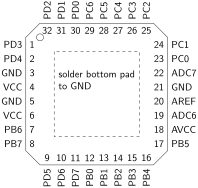
Section 4.5 Pinout Diagrams
The ATmega328P is available in multiple packages. Each one provides access to the microcontroller’s pins. As will be mentioned in Section 5.2, each of the I/O pins on the ATmega328P serves multiple purposes. This allows a pin to act either as an input/output interface or to provide a connection to a peripheral feature. In particular, pin
PC6 can either be used as an active-LOW reset pin or as a general purpose I/O pin, depending on the fuse settings (described in Section 4.7). On the Arduino Uno R3, pin PC6 is used as an active-LOW reset and is connected to a pushbutton on the printed circuit board.
The supply pins include VCC, GND, AREF, and AVCC. The VCC pin must be connected to a proper operating voltage, which is between 2.7 V and 5.5 V. It is always recommended to use a bypass capacitor (a 100 nF ceramic capacitor will likely be adequate for the speeds at which the ATmega328P will be operated in a classroom setting) between power and ground connections in close proximity to the chip on any digital device operated at high frequencies. A bypass capacitor will reduce noise on the power and ground connections and provide a stable operating voltage.
The AREF pin is the reference voltage used with the analog to digital converter (ADC). The AVCC pin is used as a supply voltage for the ADC. This pin should be externally connected to VCC even if the ADC is not being used in a circuit design. If the circuit is not sensitive to noise, connect AVCC to VCC and insert a bypass capacitor between the pin and ground. If the circuit needs more extensive noise filtering, a low-pass filter should be connected to the pin in accordance with Figure 6.4.3. [16.14]
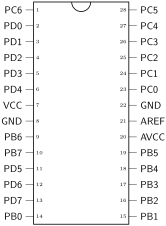
The pinout diagram of the ATmega328P’s 28-pin PDIP integrated circuit package is shown in Figure 4.5.1.
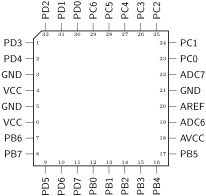
The pinout diagram for the 32-pin TQFP (thin quad flat package) integrated circuit package is shown in Figure 4.5.2.
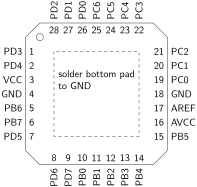
The pinout diagram for the 28-pad QFN (quad flat no-leads) integrated circuit package is shown in Figure 4.5.3.
The pinout diagram for the 32-pad QFN (quad flat no-leads) integrated circuit package is shown in Figure 4.5.4.